

Enlarging images and digital photos to sizes that go beyond the standard dimensions usually ends up in distorted and heavily pixeled images. BenVista PhotoZoom Pro helps you avoid all those problems by offering you an extensive set of professional algorithms (neatly wrapped up in a wide range of customizable resizing presets) and a set of editing tools to enhance and correct the resulting images.
Though suitable for all types of users, this professional tool has been designed mainly to be of use to image editors that need to produce oversized images (up to 1 million by 1 million pixels!) with no quality loss whatsoever. This is a professional tool with a “professional” license fee that works either as a standalone application or as a plug-in of the most renowned professional photo editors, such as Adobe Photoshop and Elements, Corel PHOTO-PAINT and PaintShop, and even Adobe Lightroom.
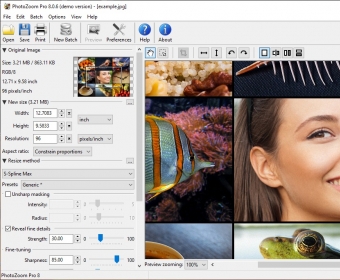
The program’s interface is not its strongest point (in design terms) but it is not difficult to navigate and use. It is fairly simple (probably thinking of its use as a plug-in within already fairly complex tools) and most of its functionality refers to the best way of enlarging an image and the best way of covering up whatever artifacts or minor quality changes may come out of it. The main interface displays a before-after two-panel window where you can see at all times what the original image looks like and how the changes you apply are improving the result, or not. more






Comments (5)
I have water with rocks in the foreground and Photoshop clearly does a better job.
On the other hand, the mountains in the background look soo much better with Photozoom.
I can not pay for this as it is half/half.